Overview
The AI-Powered Customer Engagement Platform is a B2B digital product designed to help businesses manage and oversee their AI-powered customer engagement through a centralised platform.
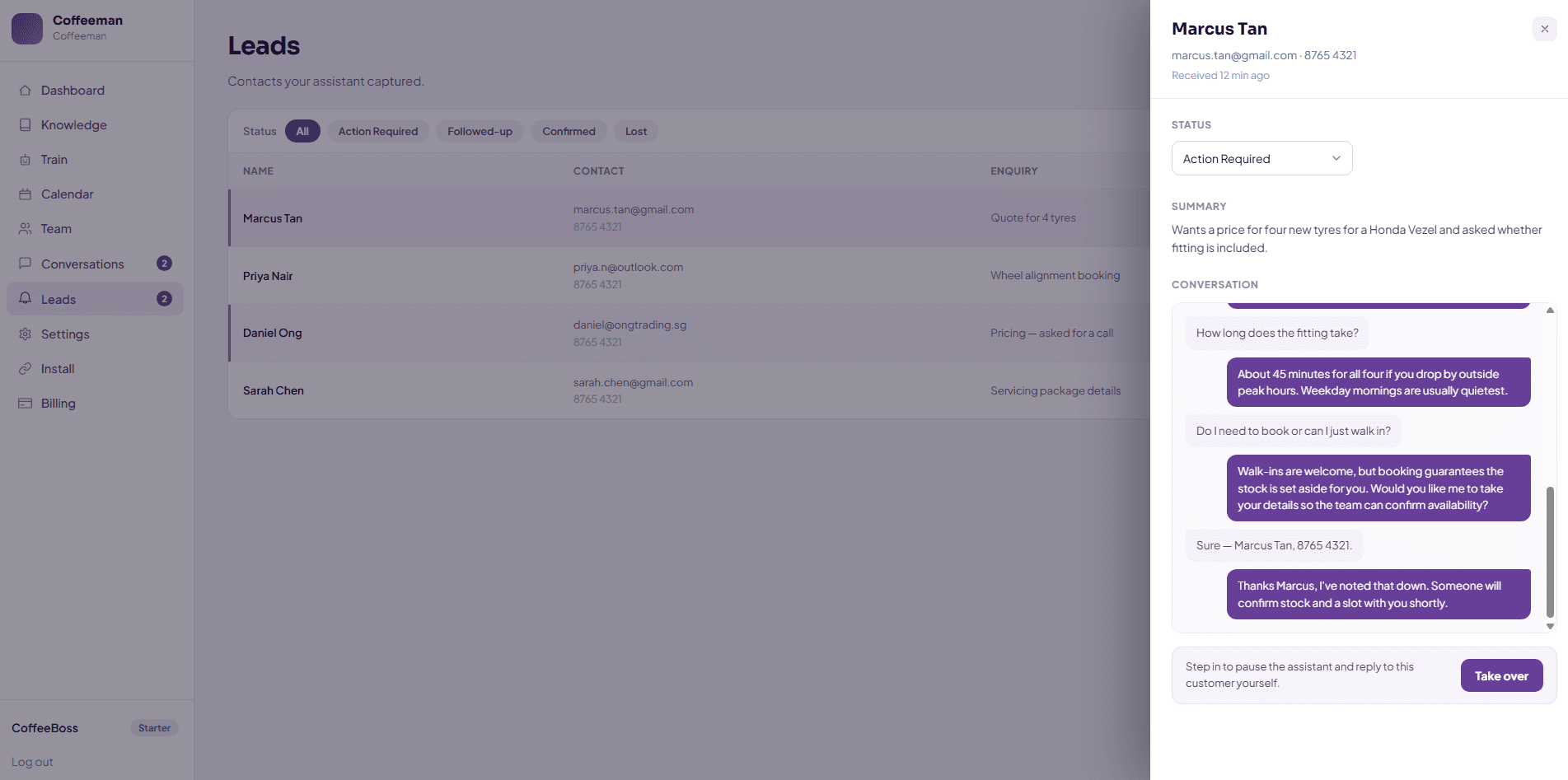
While customers interact with the AI chatbot to get grounded answers, make enquiries, or request assistance, businesses can manage conversations, leads, and AI chatbot's settings across dedicated sections of the platform.
To support more reliable AI interactions, the platform incorporates AI guardrails and a knowledge base that help control how the chatbot responds and keep its answers grounded in relevant, approved information.
Roles and Responsibilities
Role: UX Designer, UI Designer, Prototyping
Responsibilities:
Designed and refined website interfaces with a focus on clear information hierarchy, intuitive navigation, and user flow
Structured and presented analytics information through UI components and layouts to make complex data easier for users to understand and navigate
Integrated Claude Design (Beta) into the design workflow to improve efficiency and accelerate design iterations, providing design direction and functional requirements while refining AI-generated solutions to meet the intended user experience
Utilised Softwares


Problem Statement
Many businesses receive a high volume of repetitive customer enquiries through their websites, making it difficult to respond promptly while ensuring potential leads are properly captured and followed up.
While AI can automate initial customer interactions, businesses still need a clear and efficient way to manage conversations, capture leads, route enquiries to the right team members, and step in when human support is required.
Managing these interactions also requires businesses to configure and maintain the AI chatbot behind them. With different areas such as AI chatbot's knowledge management, AI guardrails, and response settings, the platform needs to present these functions in a clear and organised way, allowing users to easily find what they need and understand how to manage the chatbot.
Goal
Design an intuitive and user-friendly dashboard for businesses to view the analytics of the AI chatbot's performance, as well as managing the AI chatbot and its settings.
Simplify the management of customer conversations and leads within a centralised platform.
Organise complex platform features into a clear and easy-to-navigate experience for non-technical business users.
User Research
To understand the different needs and use cases of the platform, I researched how businesses across industries such as Automotive, Healthcare & Medical Clinics, Education & Training, Beauty & Wellness, Professional Services, and Logistics & Transportation could use an AI chatbot to support their customer enquiries.
The research focused on identifying common enquiry types, industry-specific customer needs, and how businesses would manage these interactions, providing insights into how the platform should be structured to meet their needs.


Simplifying AI Controls
AI-powered features in this project can introduce unfamiliar concepts for business users, especially when they need to configure what the chatbot knows, how it responds, and what should be restricted.
I focused on simplifying these functions through clear information hierarchy, familiar UI patterns, and task-focused interactions, so business users could easily manage the chatbot with confidence without needing to delve into the technicalities and complexity of the AI itself.
Knowledge Base
The Knowledge Base serves as a central repository which stores the information businesses want their AI chatbot to use when responding to enquiries.
Rather than requiring users to understand complex AI terminology, the interface provides simple ways for them to train the chatbot—by adding a website for the AI to crawl, importing documents, or creating custom knowledge entries.
To make the AI training process approachable for non-technical users, I focused on keeping the Knowledge Base simple, structured, and easy to navigate.
The Knowledge Base is organised into three categories: Manual, Imported, and Document. This allows users to quickly understand what type of information their chatbot is learning from and where each knowledge source comes from. Separating these sources reduces the uncertainty about what the AI can use when responding to customers, which provides users with greater confidence and control when reviewing, updating, or removing knowledge sources.

Training their AI Chatbot
The Training section simplifies the process of providing information to the chatbot. Users can either add website links for the chatbot to crawl, or upload documents containing relevant information of their own businesses. By presenting these options as clear and straightforward actions, users can easily expand the chatbot’s knowledge while maintaining a clear understanding of how their inputs contribute to its responses.

Simplifying AI Guardrails Settings
AI guardrails can be technically complex, so I designed these controls as straightforward settings that business users can configure without needing technical AI knowledge.
Each setting clearly communicates how the chatbot will behave, particularly when it encounters questions it cannot confidently answer. Users can define what the chatbot can answer, when it should escalate to a human, how it should respond when it cannot provide an answer, and which topics it should avoid.
By making these behaviours explicit and configurable, the settings reduce uncertainty around the chatbot’s boundaries and make its responses more predictable for both businesses and their customers.

The final design provides businesses with a centralised platform to manage their AI customer engagement experience.
By organising complex AI functions into clear workflows and an accessible interface, the design aims to give business users greater clarity and control over how their chatbot operates and how customer enquiries are managed.