Roles and Responsibilities
Role: UX Designer, UI Designer
Responsibilities:
Target Audience and User Research
UI/UX Design, Application Prototyping and Iterations
Overview
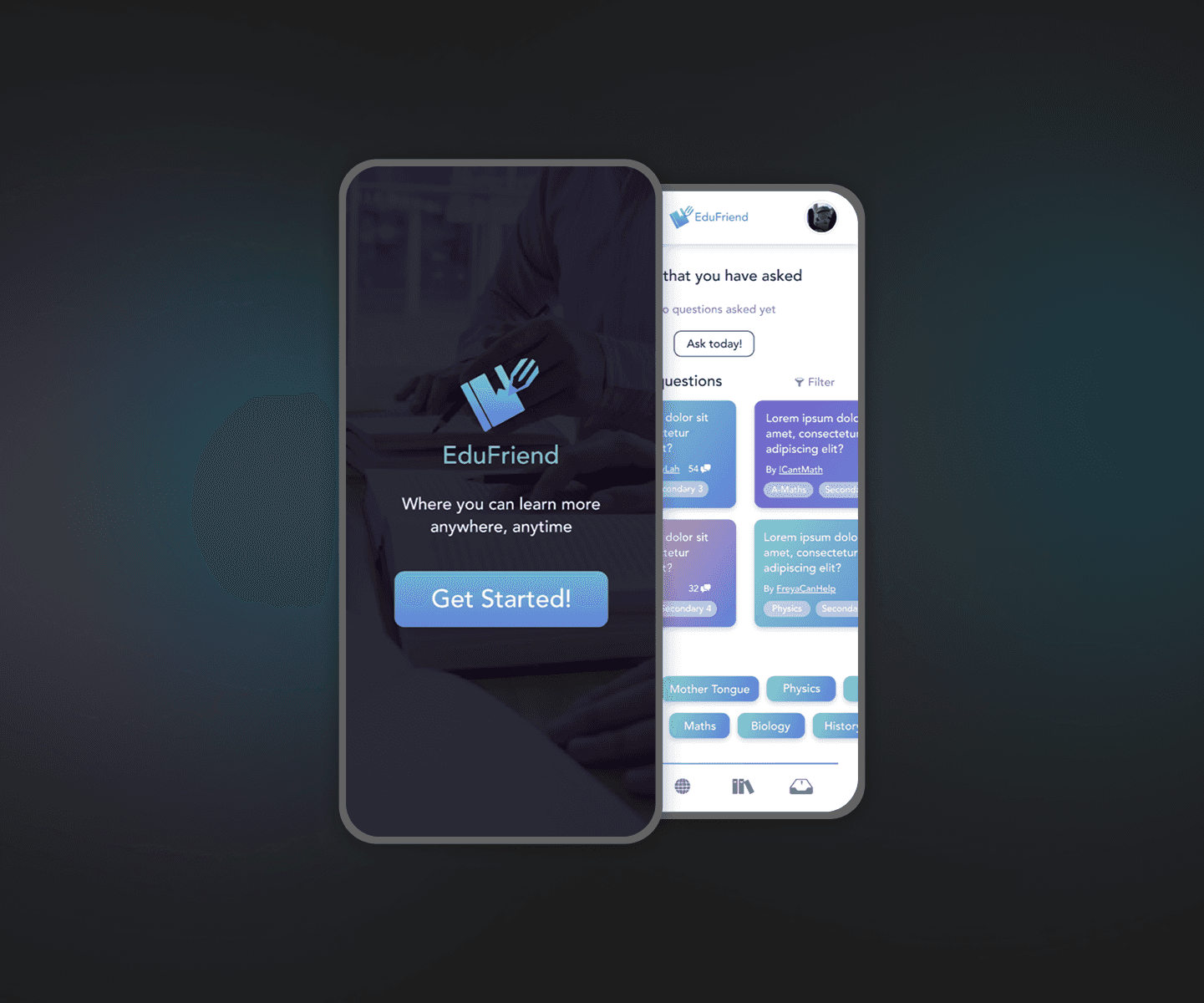
EduFriend is a peer-mentoring education mobile application prototype designed to support students in addressing challenging assignment questions while fostering collaborative online learning through an online peer community.
Problem Statement
Students in both primary and secondary education often encounter difficulties understanding subject topics and underlying concepts. However, access to timely and appropriate academic support is not always readily available when these difficulties arise.
EduFriend is a friendly, accessible educational application designed to address these issues, providing immediate peer-based assistance and support.
What was done?
As the designer on this solo project, I aimed to create an educational application prototype that prioritises usability while delivering engaging interactions for young students. The design approach incorporated visual and interaction elements—such as vibrant colours and light gamification—to capture students’ attention and encourage continued engagement.
Target Analysis
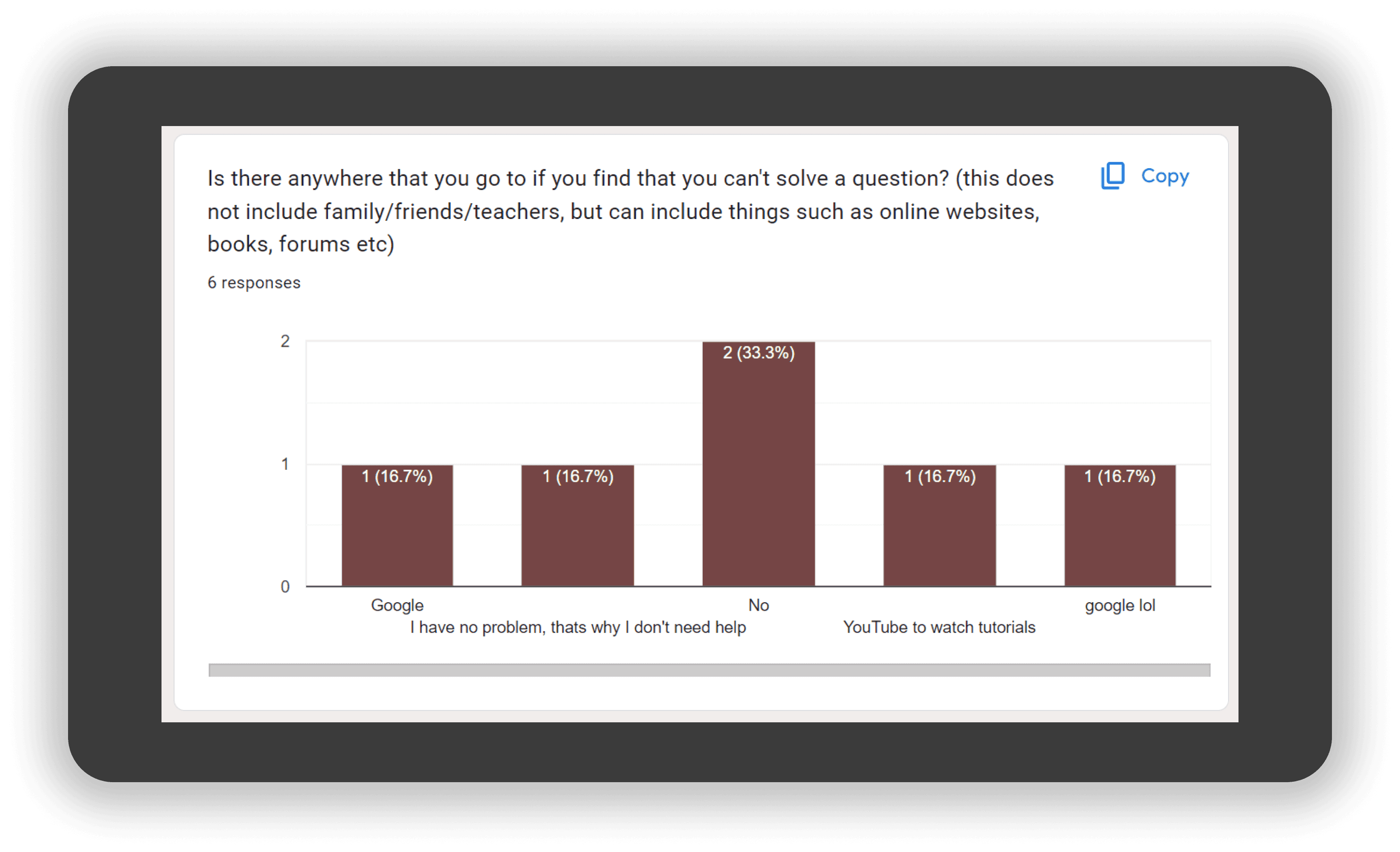
In today’s learning environment, both primary and secondary school students are increasingly exposed to online educational platforms that provide easy access to assignments and supplementary learning materials. As a result, students who encounter difficulties in their studies often turn to search engines and video platforms, such as Google and YouTube, for guidance and self-directed learning support.
User Research - Survey
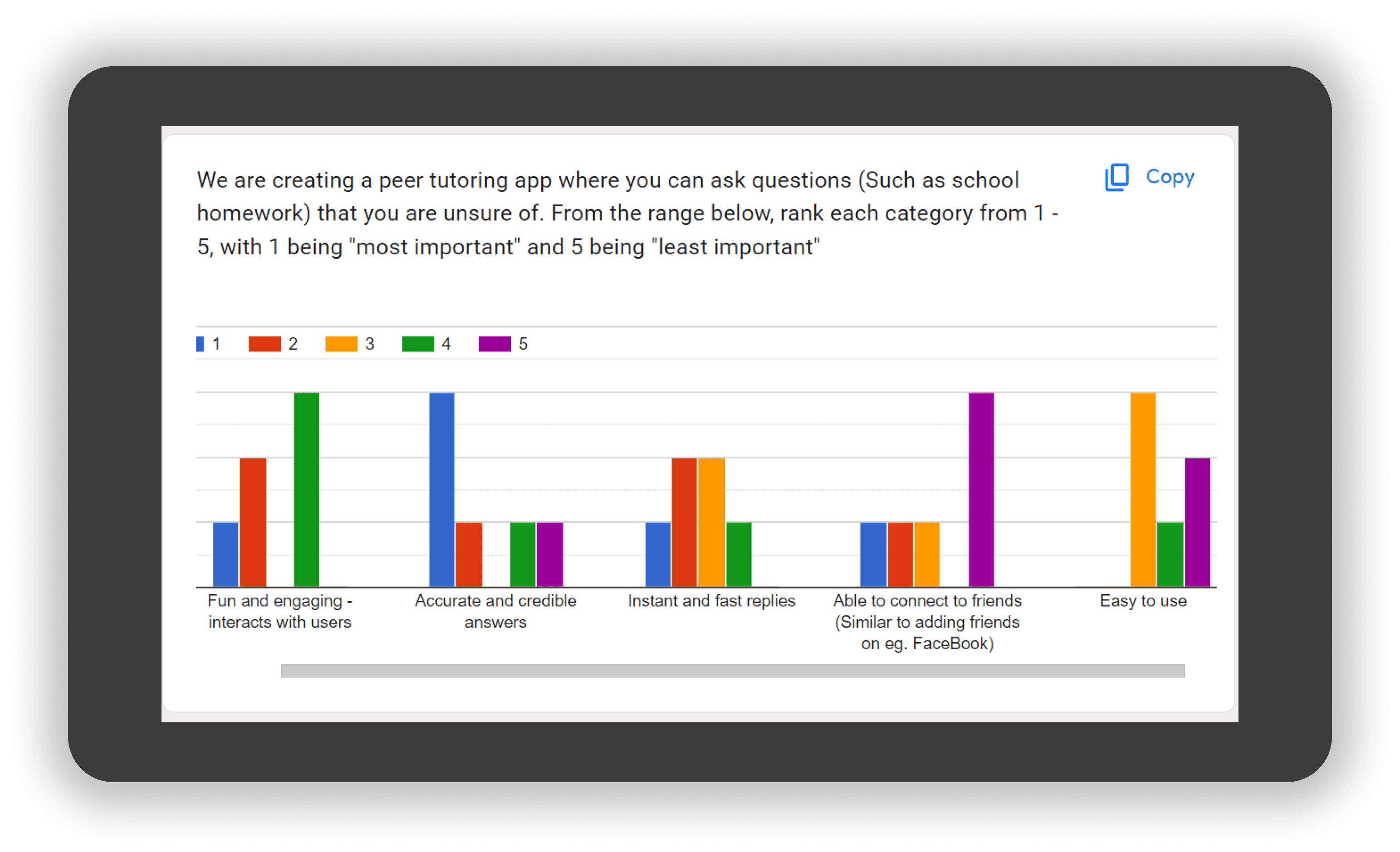
I began the project by conducting a survey with primary and secondary school students to better understand how they approach questions they find challenging. The survey first captured participants’ education level and prior experience with educational applications to establish context.
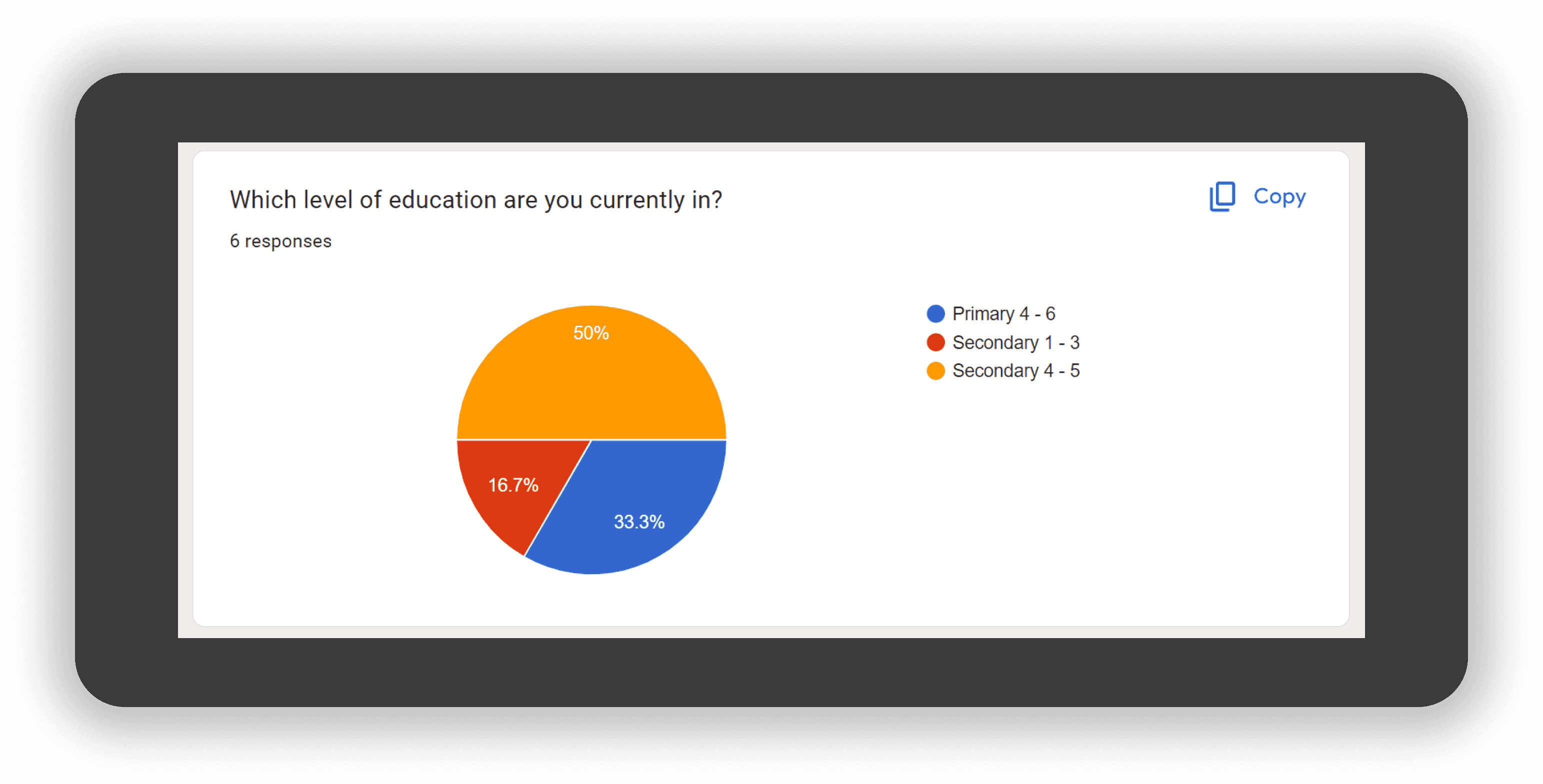
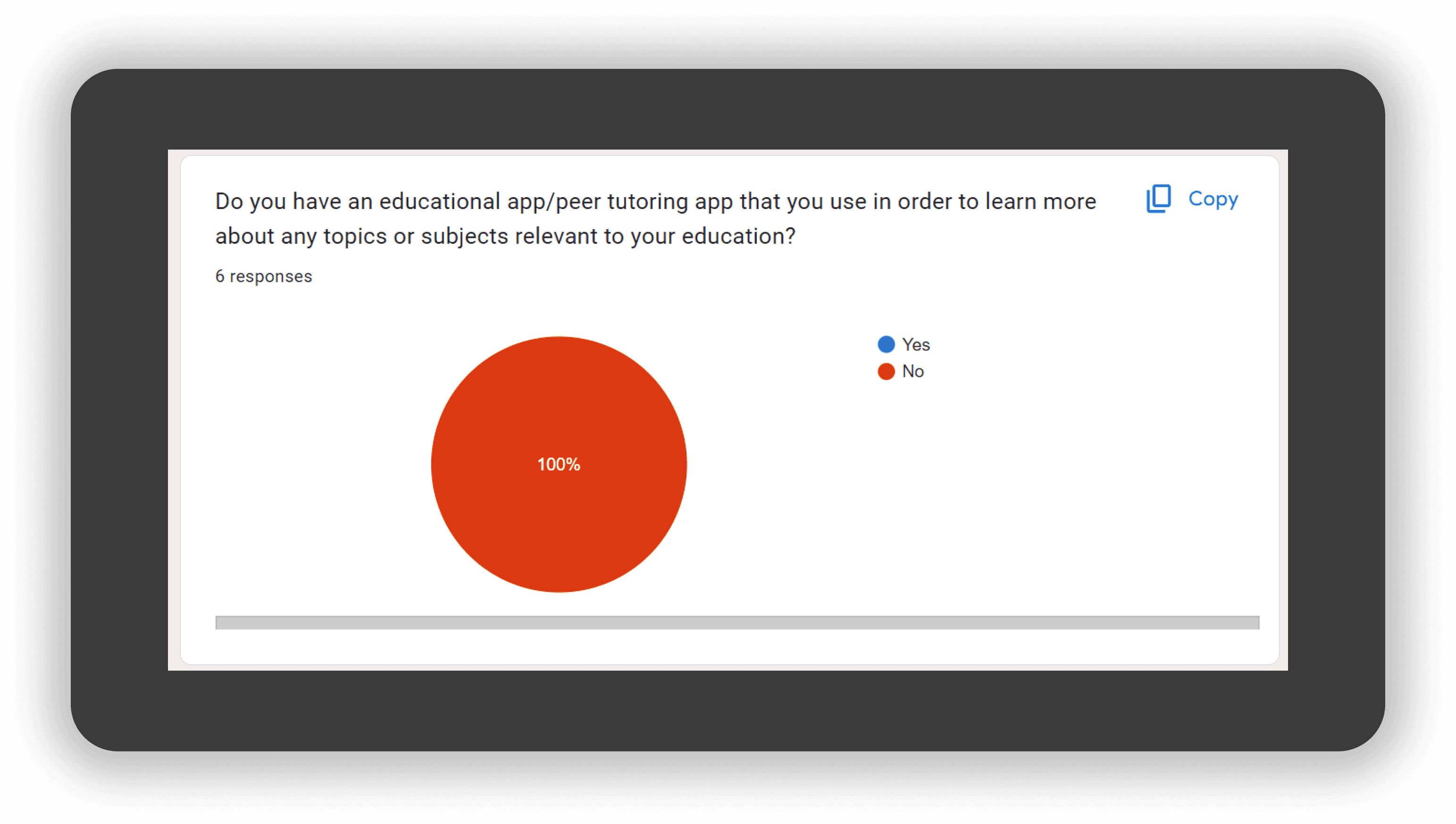
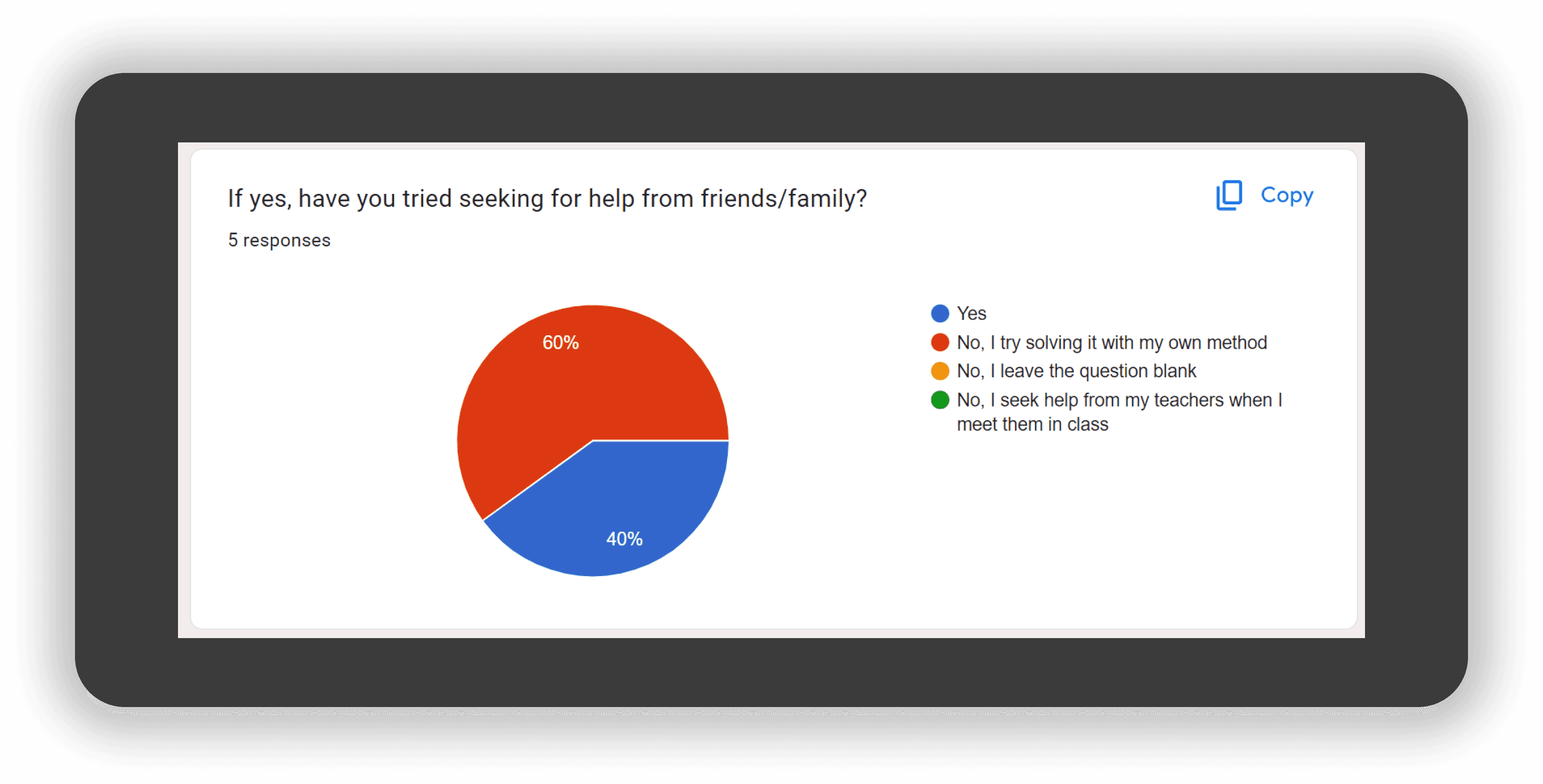
The questions were designed to identify whether students typically seek help from teachers or tutors, rely on online resources, or turn to social and digital platforms for support. This also allowed me to understand which platforms students commonly use when searching for academic assistance.
Additional questions were included to explore students’ preferences for educational applications, as well as the features and functionalities they value most in a peer tutoring experience.
User Research - Face to Face
In addition to the survey, I conducted one-to-one interviews with three participants: a Primary 5 student, a Secondary 4 student, and a secondary school teacher. These interviews provided deeper qualitative insights into students’ learning behaviours and support-seeking patterns.
Primary 5 student — Key insights
Primary school students are regularly exposed to online educational platforms, primarily for completing assignments. Digital submissions were perceived as more convenient than handwritten work, and assignments often involved watching educational videos prior to completion. This encouraged self-directed learning, as students were prompted to search for additional videos and resources independently.
However, observations revealed that students showed a strong preference for gamified elements within learning platforms. When encountering difficulties, they were more likely to text or call peers to discuss homework rather than seek help from teachers. Post-school interactions with teachers were minimal, limiting students’ access to timely academic support.
Secondary 4 student — Key insights
Secondary school students tend to consult teachers when they face challenges with specific subjects or chapters. However, due to time constraints and classroom dynamics, not all students are able to receive clarification. As a result, some students missed out on opportunities to fully understand topics they struggle with.
Secondary school teacher — Key insights
Teachers often utilise online learning platforms and view them as valuable tools for supporting both teaching and learning. Platforms such as Edmodo and Google Classroom were highlighted for their ability to facilitate communication and information sharing between students and teachers beyond the classroom.
Goal
Providing users with a platform where they can learn from one another.
Allows users to easily reach out to teachers and access guides offered by certified educators.
Keep users motivated and engaged through incentives and gamification.
Target Audience
Based on the above researches and goals, the following target audiences is determined as follows:
Upper primary students and secondary school students who seeks support for their studies and education.
Demographics
Nationality: Singaporeans and Permanent Residents
Age: 10 - 18
Gender: Both
Race: All Races
Household / Individual Income: Monthly income of $0 – $300
Education: Children and Teenagers in primary & secondary education
Occupation: Students
Psychographics
Lifestyle: Experiencing stress from failed attempts to solve questions that are proven to be difficult to them, with no one to turn to for help. Due to this issue, they are unable to find out a solution to it and tend to leave questions blank, thus encouraging the behaviour of skipping questions on a regular basis
Attitudes: Face difficulties finding the correct solutions to difficult questions and have no one to seek assistance from instantly. Feels that it will be best if they have a platform where they can get help from immediately so that they can learn and improve on their studies
Personality: Open to asking educational questions online, willing to learn from any useful information present, and offering help to those in need of educational assistance
Benefits sought: Find out answers to unsolvable questions from others who are willing to assist them in solving educational questions
Usage rate: Daily or A few times per week; when they have questions that are unable to be solved with their knowledge alone, or they have no one to turn to for help
User Persona
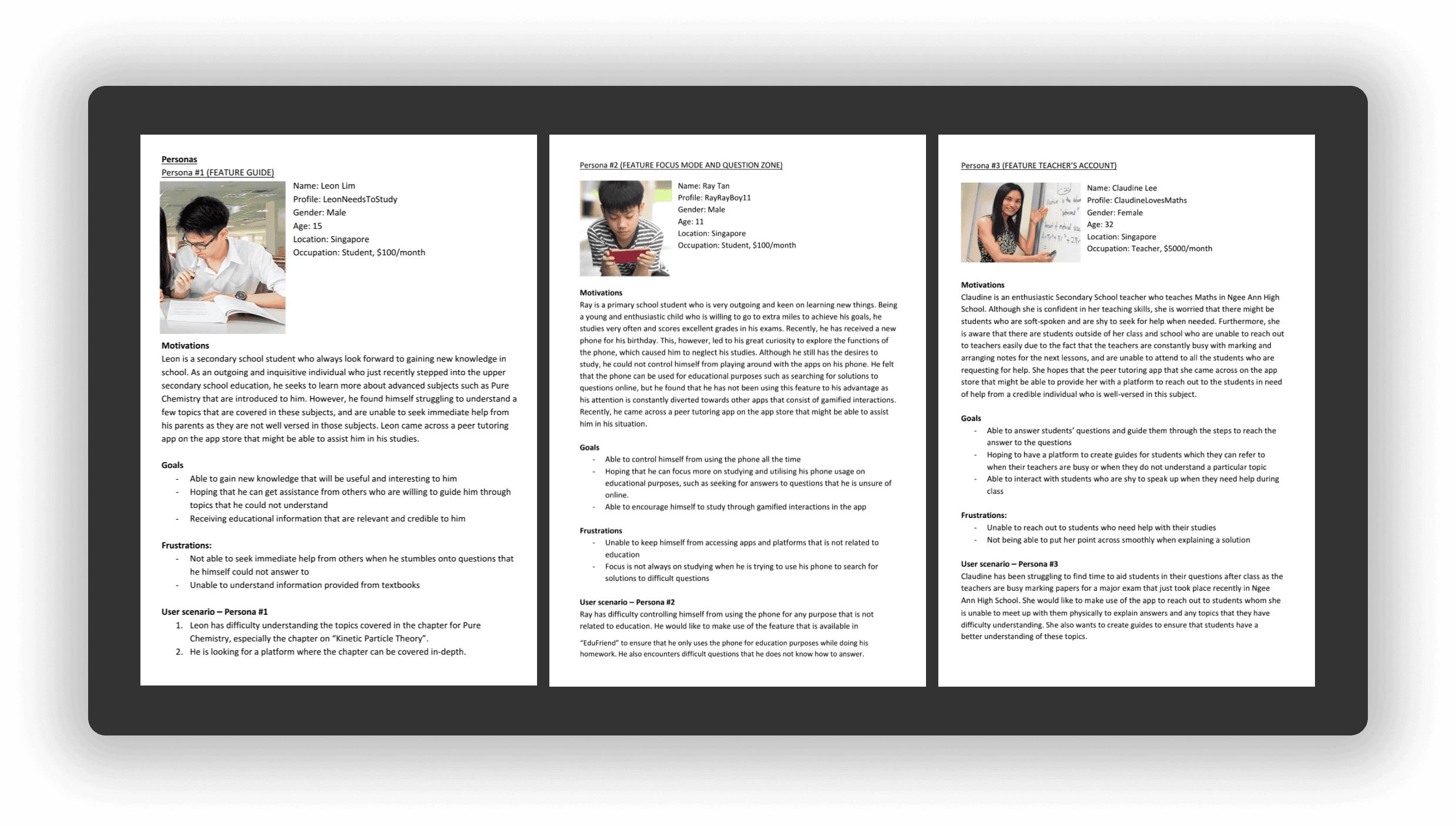
I began by developing three user personas representing the key user groups: primary school student, secondary school student, and secondary school teacher. Each persona was created with distinct goals and objectives to reflect their differing needs and roles within the learning ecosystem.
To ensure accuracy and relevance, the personas were based on feedback received from the interview participants, with their habits, behaviours, and attitudes built into the user persona. As these groups represent the primary target audiences for the application, greater emphasis was placed on defining their motivations, pain points, and goals based on real-world experiences.
User Task Flow
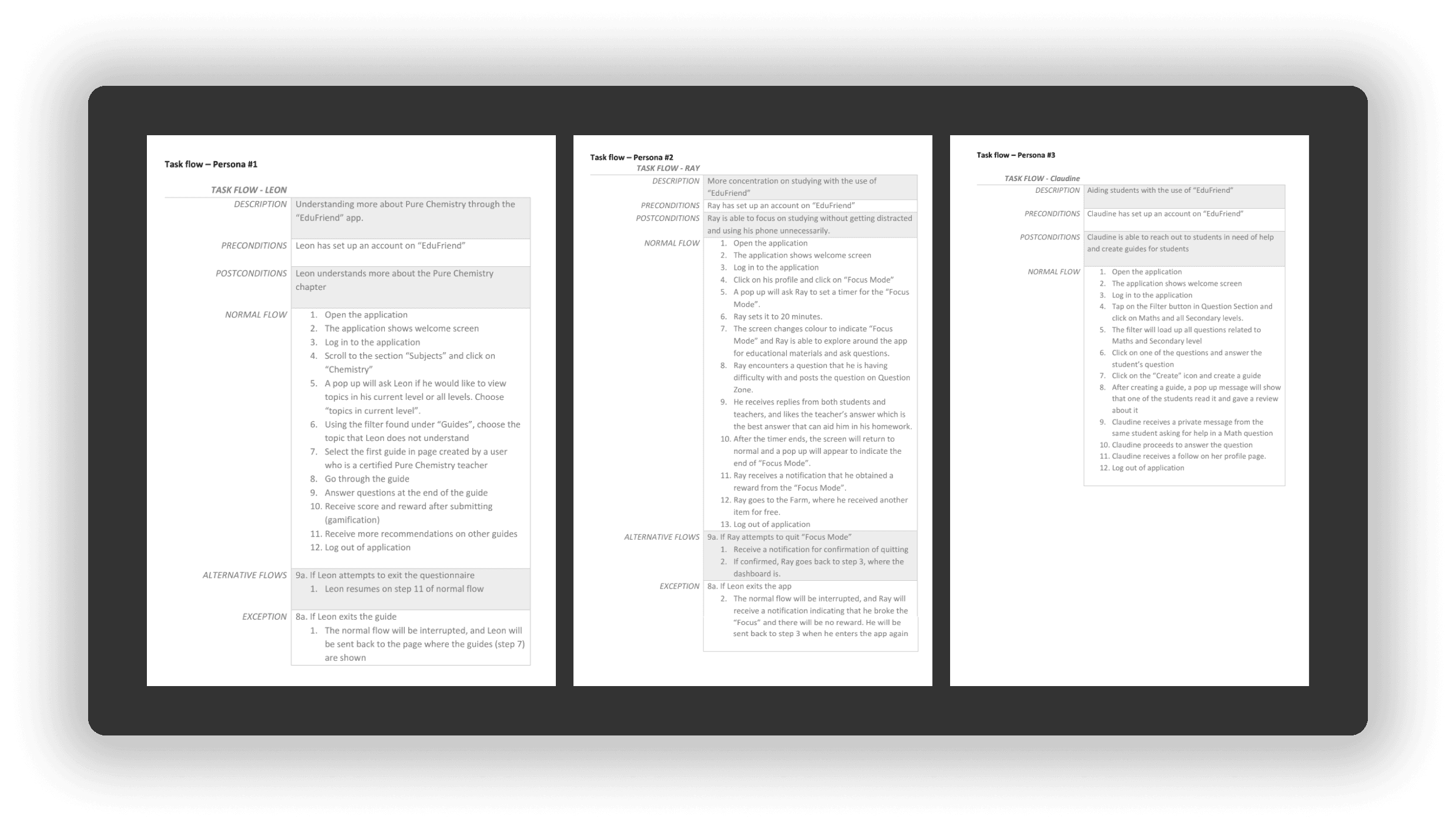
With the user personas established, individual task flows were created for each persona to map the potential journeys users would take to accomplish their goals within the application.
These task flows helped visualise key actions, decision points, and interactions, providing clarity on how different users would navigate the experience.
Site Map
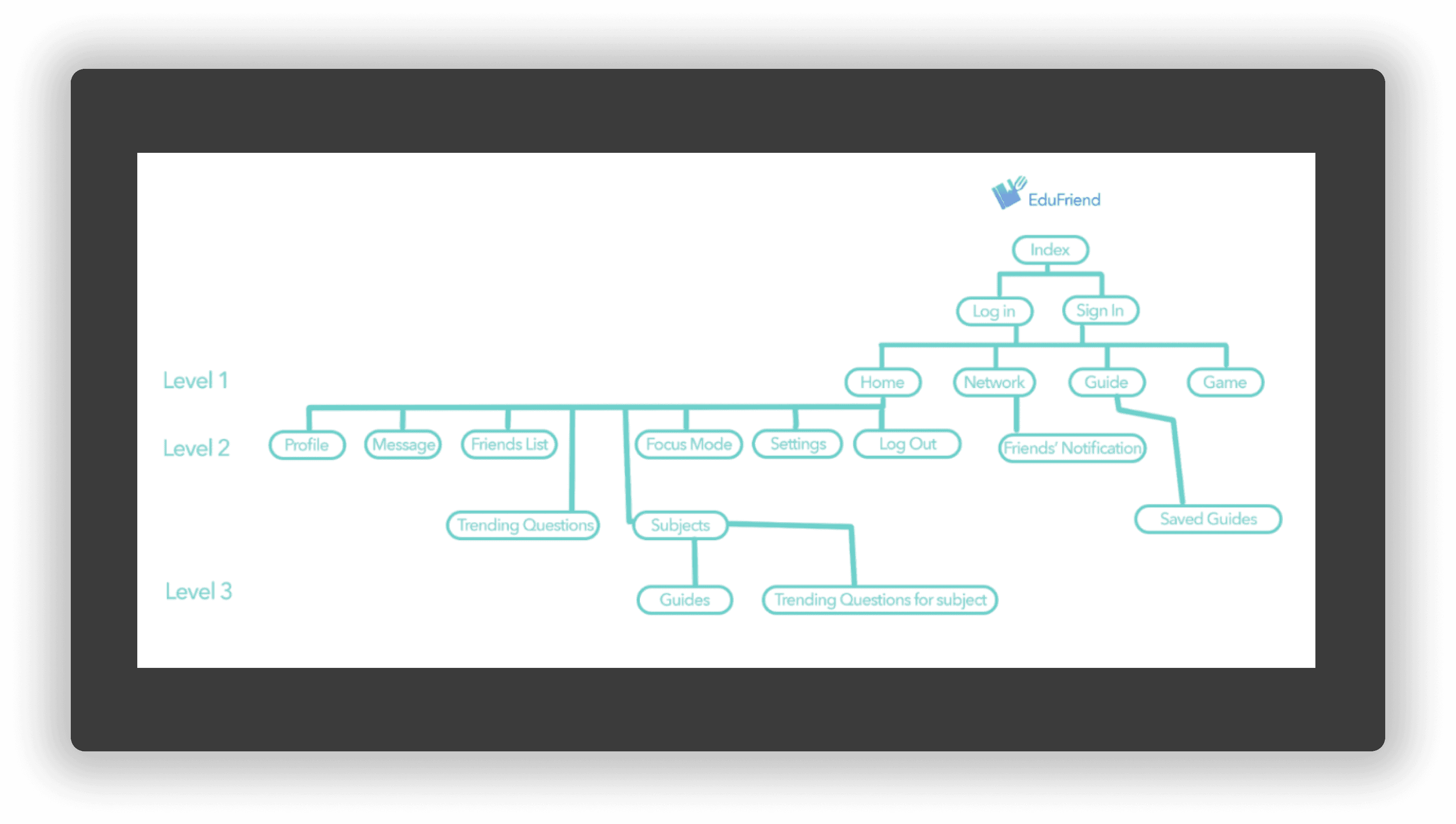
Based on the insights from the user personas and survey results, the following key functions were prioritised for the application:
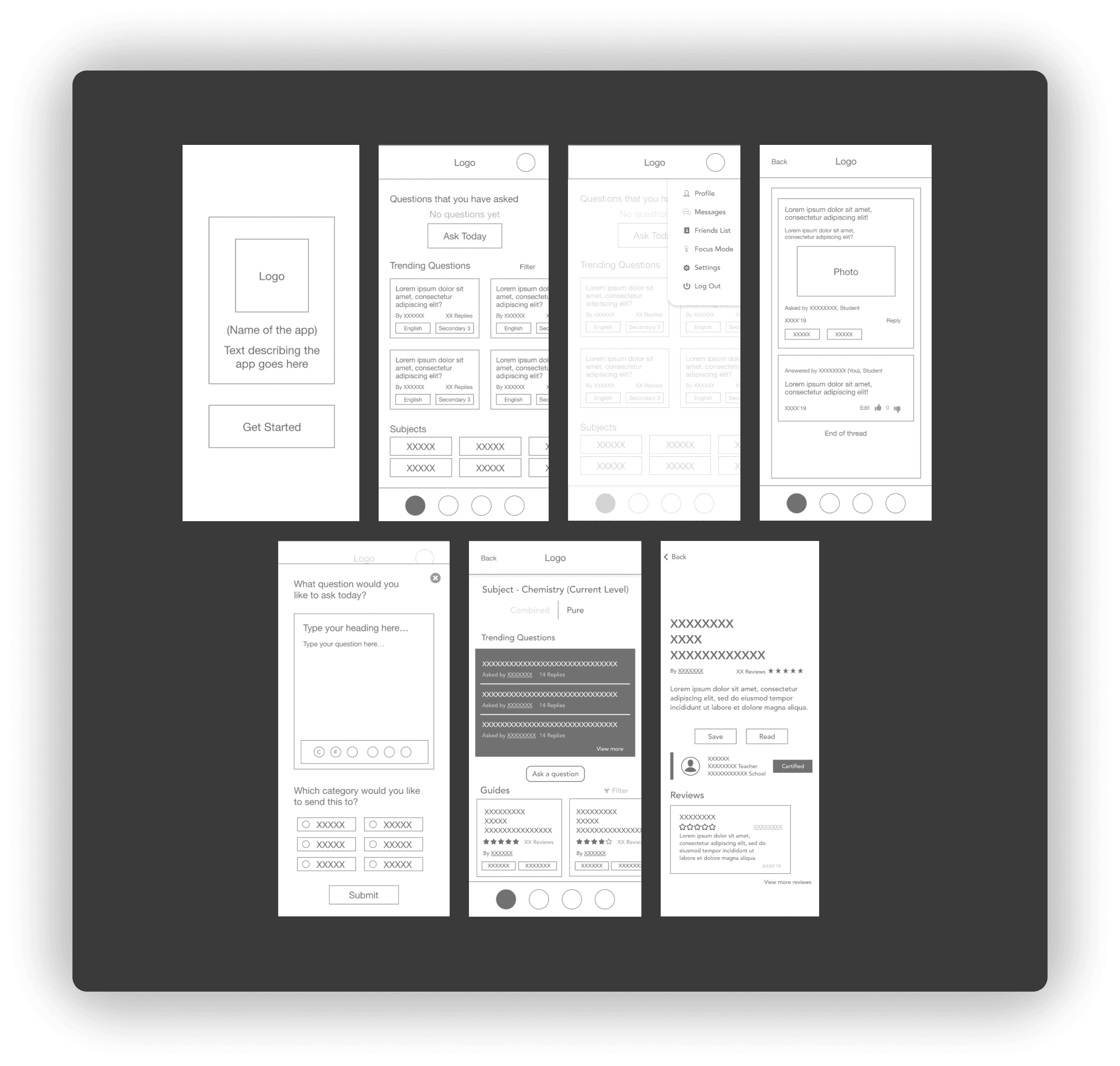
Question zone (divided by categories such as primary/secondary/subjects)
Focus Mode (a function that is similar to Forest)
Guides Section (where guidebooks made by teachers are displayed for students to refer to)
Gamification – A farm where users can gain rewards from answering questions, thumbs-up, Focus Mode, etc.
Low Fidelity Prototype